
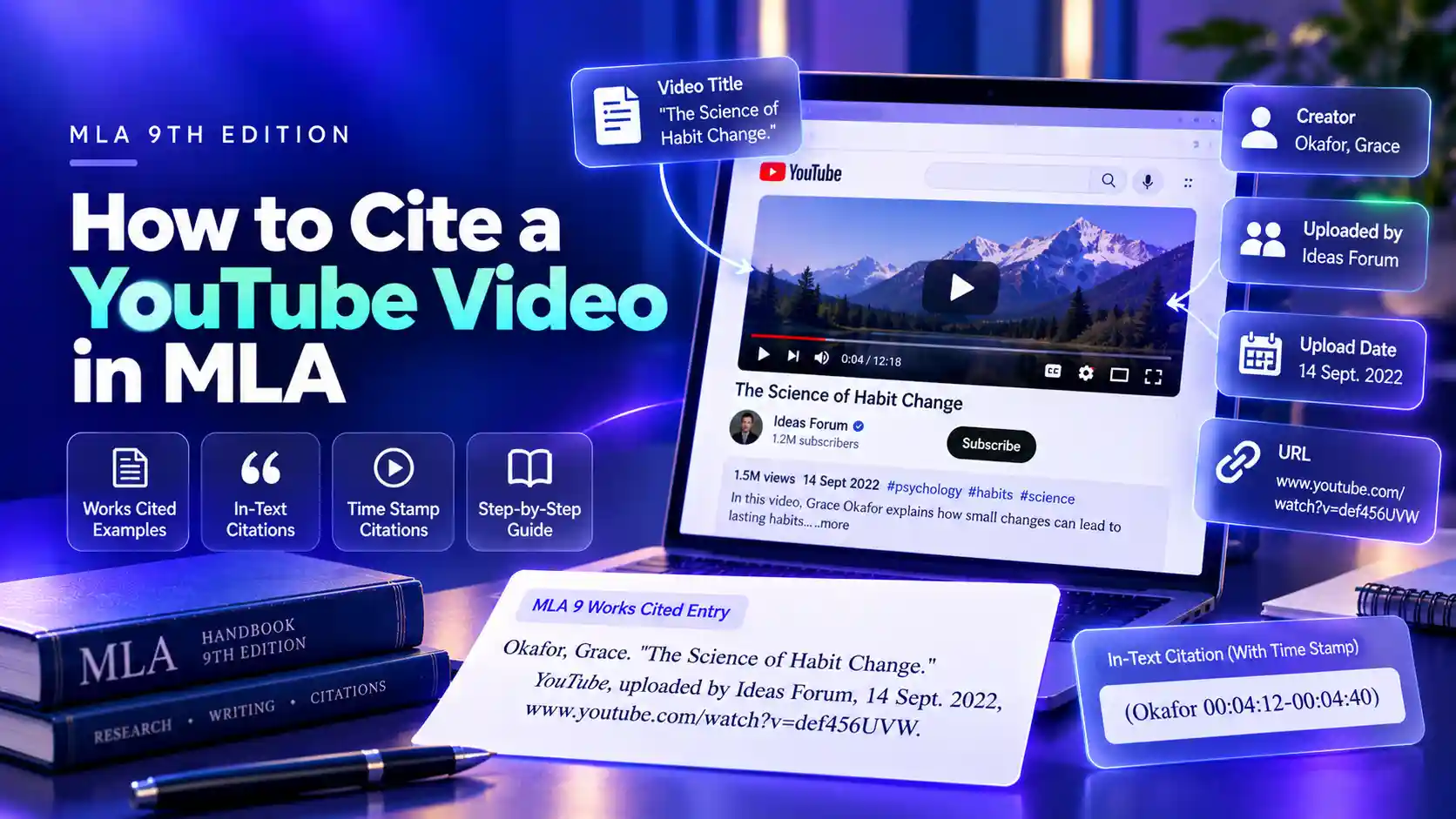
A YouTube citation in MLA depends on one question: did the channel that uploaded the video also create it? If it did, start with the video title. If someone else created it, start with the creator's name. Everything else follows the same pattern:
“Title of Video.” YouTube, uploaded by Channel Name, Day Month Year, URL.
This guide follows the MLA Handbook, 9th edition. It shows how to choose the first element, where to find each detail on the video page, and how to cite a specific moment with a time stamp. Build the full entry automatically with the Works Cited Generator.
Creator or Uploader: Which Name Goes First?
The creator is the person or group responsible for the content, such as the speaker, performer, or producer. The uploader is the channel that posted it. They are often the same, but not always.
| Situation | Start the Entry With | uploaded by |
|---|---|---|
| A channel posts its own video | Video title | The channel name |
| A channel posts someone else's talk, lecture, or performance | Creator's name, last name first | The channel name |
| No clear creator is shown | Video title | The channel name |
Starting with the title when creator and uploader match keeps the same name from appearing twice in one entry.
MLA YouTube Citation Examples
These illustrative entries cover the situations students run into most.
| Situation | MLA 9 Works Cited Entry |
|---|---|
| Channel created and uploaded the video | “How Black Holes Form.” YouTube, uploaded by Space Explained, 8 Mar. 2023, www.youtube.com/watch?v=abc123XYZ. |
| Speaker's talk uploaded by another channel | Okafor, Grace. “The Science of Habit Change.” YouTube, uploaded by Ideas Forum, 14 Sept. 2022, www.youtube.com/watch?v=def456UVW. |
| Two presenters | Rivera, Ana, and Tom Hale. “Budgeting for College Students.” YouTube, uploaded by Money Basics, 2 Feb. 2024, www.youtube.com/watch?v=ghi789RST. |
| No upload date visible | “Intro to Photosynthesis.” YouTube, uploaded by Bio Lab, www.youtube.com/watch?v=jkl012MNO. Accessed 14 Jan. 2025. |
Keep the channel name exactly as it appears on YouTube, but put the video title in MLA title case. If you are unsure about capitalization, run the title through the MLA Title Case Converter first.
Where to Find Each Detail on YouTube
Everything you need sits on the video page itself.
| Citation Detail | Where to Look |
|---|---|
| Video title | Bold text directly under the video player |
| Channel name | Next to the channel icon, below the title |
| Creator or speaker | Video description, opening credits, or the video itself |
| Upload date | Top of the description box; click more if only a relative date like 2 years ago is shown |
| URL | Browser address bar or the Share button |
Use the full youtube.com address rather than a shortened youtu.be link, and remove any time stamp added to the end of the URL. MLA lets you leave out the https:// part.
In-Text Citations with Time Stamps
Videos have no page numbers, so MLA uses time stamps instead. Write the time as hours, minutes, and seconds, separated by colons, and give the range you are citing.
| Situation | In-Text Citation |
|---|---|
| Creator named in the entry | (Okafor 00:04:12-00:04:40) |
| Entry starts with the title | (“How Black Holes Form” 00:01:05-00:01:30) |
| Citing the video as a whole | (Okafor) |
| Creator named in your sentence | Grace Okafor argues that habits form through repetition (00:04:12-00:04:40). |
The first word of your in-text citation must match the first word of the Works Cited entry, whether that is the creator's last name or the video title.
Use the MLA In-Text Citation Generator to format the time range automatically.
Special Cases: Shorts, Comments, Films, and TED Talks
Some YouTube content needs a small change to the standard pattern. These examples are illustrative.
- YouTube Shorts: use the same format as a regular video, with the Shorts URL. Example: “Three Study Tips in 60 Seconds.” YouTube, uploaded by Study Smart, 3 Apr. 2024, www.youtube.com/shorts/xyz321ABC.
- A comment on a video: start with the commenter's username, then describe the comment and name the video. Example: @maya_reads. Comment on “How Black Holes Form.” YouTube, uploaded by Space Explained, 10 Mar. 2023, www.youtube.com/watch?v=abc123XYZ.
- A full movie or TV episode: cite it as a film or episode first, with the director or studio, then add YouTube and the URL as a second container.
- A TED Talk found on YouTube: list the speaker as the creator and follow the YouTube format, with the uploading channel after uploaded by.
For other sources with no page numbers, the same no-invented-locator rule applies — see citing a website without page numbers.
Common Mistakes in MLA YouTube Citations
| Mistake | Fix |
|---|---|
| Listing the channel as author and again after uploaded by | Start with the title when creator and uploader match |
| Citing a fan upload under the fan's name for an artist's work | Put the real creator first, the fan channel after uploaded by |
| Writing YouTube in plain text | Italicize it as the container: YouTube |
| Copying the title in all caps or with emojis | Use MLA title case; drop emojis that are not part of the meaning |
| Citing a long passage with only a start time | Give the full range: (Okafor 00:04:12-00:04:40) |
| Leaving out the upload date | Add it from the description box, or add an access date if none is shown |
When a fan or aggregator channel reposts a video, look for the original upload from the creator's own channel and cite that version instead.
Final Check
A YouTube citation follows the same logic as any video or film source: decide who really made it, name the platform as the container, and give readers a way to find the exact moment you are discussing.
Before submitting your paper, confirm every YouTube citation starts with the same name or title in both the Works Cited entry and the in-text citation, and that any time stamp matches the passage you are referencing.
Ready to build your citation?
Try the free Works Cited Generator