
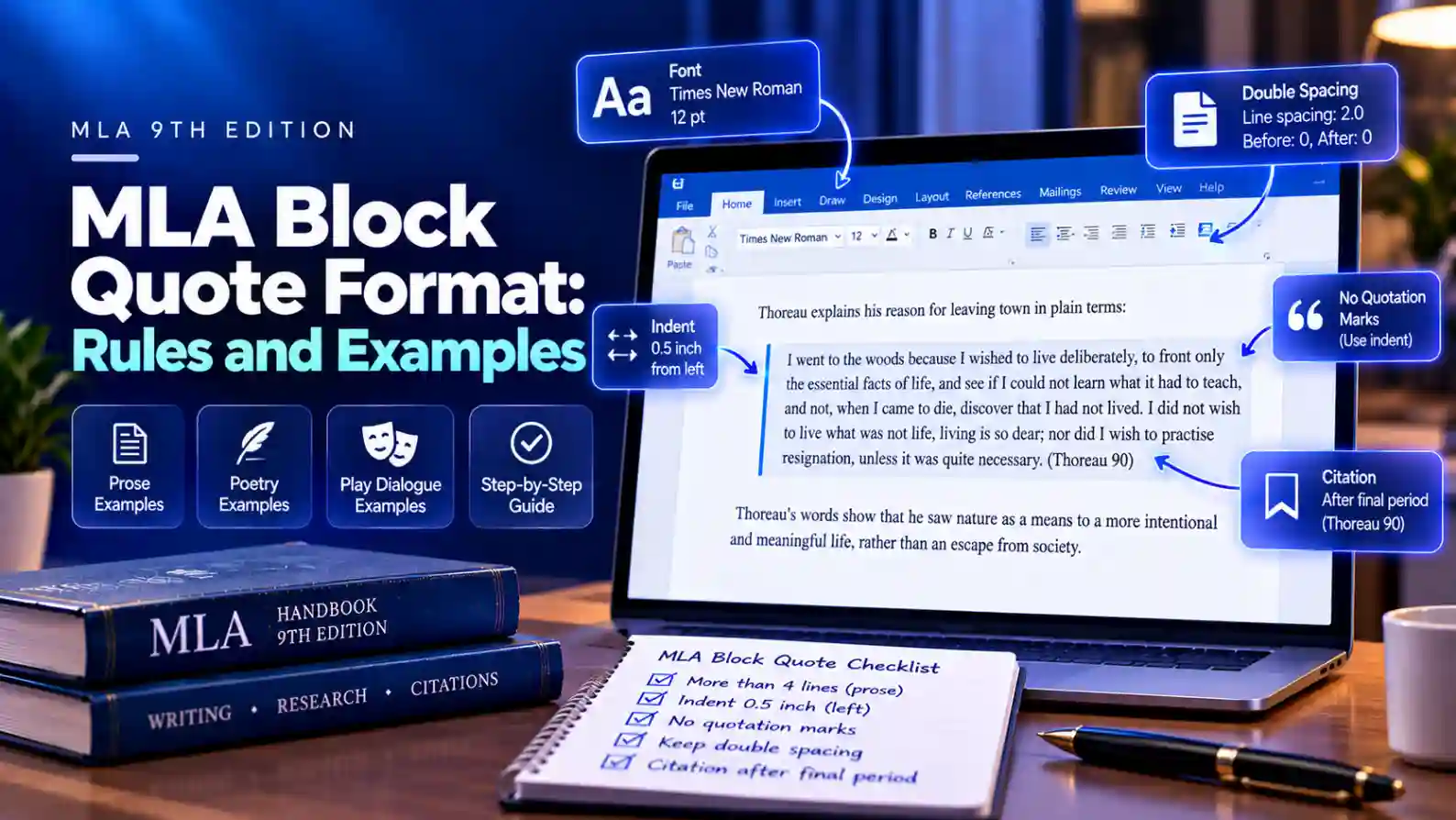
Once a quotation runs longer than four lines in your paper, MLA stops using quotation marks and sets the passage apart as a block quote. You indent the whole passage half an inch from the left margin, keep it double-spaced, and place the citation after the final punctuation mark.
Poetry and play dialogue follow their own versions of this rule. This guide covers all three, based on the MLA Handbook, 9th edition, with examples drawn from public domain works. Quoting scripture instead? See how to cite the Bible in MLA.
When to Use a Block Quote in MLA
The length is measured in your own paper, typed in your essay's font, size, and margins. It is not measured in the original source.
| Type of Quote | Use a Block Quote When It Runs | Shorter Quotes |
|---|---|---|
| Prose | More than four lines | Stay in your sentence, in quotation marks |
| Poetry | More than three lines of verse | Stay in your sentence, with a slash between lines |
| Dialogue from a play | Two or more characters speaking | A single character's short line stays in your sentence |
Block quotes take up a lot of space, so use them only when the exact wording matters to your argument, and always follow one with your own analysis.
How to Format a Prose Block Quote
Follow these five rules for any long prose quotation.
- Introduce it. End your lead-in sentence with a colon if it is a complete sentence. If the quote finishes your sentence, use no punctuation or whatever the grammar needs.
- Start on a new line. Indent the entire passage 0.5 inch from the left margin. Do not add a first-line indent.
- Drop the quotation marks. The indentation already shows it is a quote. Use double quotation marks only for quotes inside the passage.
- Keep double spacing. Do not single-space the block or add extra lines around it.
- Cite after the final period. Put the citation after the passage's last punctuation mark, with no period after the parentheses.
Here is how it looks in a paper. The page number depends on the edition you use.
Thoreau explains his reason for leaving town in plain terms:
I went to the woods because I wished to live deliberately, to front only the essential facts of life, and see if I could not learn what it had to teach, and not, when I came to die, discover that I had not lived. I did not wish to live what was not life, living is so dear; nor did I wish to practise resignation, unless it was quite necessary. (Thoreau 90)
Your analysis then continues at the normal margin, as a new line of your own paragraph.
Quoting More Than One Paragraph
When your block quote covers two or more paragraphs of the original, keep the paragraph breaks.
- Indent the whole block 0.5 inch, as usual.
- Indent the first line of each new paragraph an extra 0.25 inch beyond the block.
- If your quote starts mid-paragraph in the source, do not add the extra indent to the first line; add it only to the paragraphs that follow.
- Place the citation once, after the final paragraph.
If you skip text between paragraphs, mark the gap with an ellipsis: three periods with spaces between them ( . . . ).
How to Block Quote Poetry
For more than three lines of verse, keep every line break exactly as the poet wrote it.
- Indent each line 0.5 inch from the left margin.
- Reproduce the poem's own spacing, punctuation, and capitalization.
- If a line is too long to fit, indent the rest of it further on the next line.
- Cite line numbers, not pages, if the poem numbers its lines. Write lines the first time, then numbers alone.
Robert Frost opens the poem with a choice:
Two roads diverged in a yellow wood,
And sorry I could not travel both
And be one traveler, long I stood
And looked down one as far as I could
To where it bent in the undergrowth; (lines 1-5)
For three lines or fewer, keep the quote in your sentence and mark line breaks with a slash: Frost writes, “Two roads diverged in a yellow wood, / And sorry I could not travel both” (lines 1-2). Use two slashes ( // ) to show a stanza break.
How to Block Quote Dialogue from a Play
When two or more characters speak, set the exchange off as a block, even if it is short.
- Indent each character's name 0.5 inch and write it in capital letters, followed by a period.
- Start the speech right after the name.
- If a speech runs onto more lines, indent those lines an extra amount so the names stand out.
- Begin a new line for each new speaker, and cite act, scene, and line numbers at the end.
The opening of Hamlet shows the pattern:
BARNARDO. Who's there?
FRANCISCO. Nay, answer me. Stand and unfold yourself. (Shakespeare, Hamlet 1.1.1-2)
Line numbers and character spellings vary slightly between editions, so cite the edition listed in your Works Cited.
How to Indent a Block Quote in Word and Google Docs
Select the quoted passage first, then use the method for your program.
| Program | Quick Method | Exact Method |
|---|---|---|
| Microsoft Word | Home tab, Increase Indent button (moves 0.5 inch) | Paragraph dialog: Left 0.5 inch, Special set to None |
| Google Docs | Ctrl + ] (Cmd + ] on Mac) | Format, Align & indent, Indentation options: Left 0.5 inch, Special indent None |
If your body paragraphs use a first-line indent, the block can inherit it and look staggered. Setting Special to None fixes that. For step-by-step setup of the rest of your paper, see the guides on MLA format in Microsoft Word and Google Docs.
Common MLA Block Quote Mistakes
| Mistake | Correct Approach |
|---|---|
| Wrapping the block in quotation marks | Remove them; the indent marks it as a quote |
| Period after the citation: ...lived. (Thoreau 90). | Citation after the final period, nothing after it: ...lived. (Thoreau 90) |
| Single-spacing or shrinking the font | Keep the same double spacing and font as the essay |
| Indenting from both margins | Indent from the left margin only |
| Using a block for a three-line prose quote | Keep quotes of four lines or fewer in your sentence |
| Dropping a block quote with no lead-in or analysis | Introduce it before and explain it after |
| Using APA's 40-word rule | MLA counts lines in your paper, not words |
If the in-text citation itself is the part you are unsure about, the MLA In-Text Citation Generator formats the author and page for you.
Ready to build your citation?
Try the free In-Text Citation Generator